
Event Management Software Actiolife
Manage every step of your event on one platform, from digital invitations and RSVP to QR code check-in and badge printing. Browser-based, nothing to install.

What is Actiolife?
What Is Actiolife Event Management Software?
Actiolife is an online event management platform where individuals and businesses plan, run and analyse their events.
- 1
Invite
Upload your guest list or create a registration form, and send personalised digital invitations with QR codes.
- 2
Collect RSVPs
Guests reply on their invitation page and you follow responses in a live dashboard.
- 3
Check in
On the day, QR codes are scanned and badges print at the door.
- 4
Analyse
View attendance, delivery and check-in reports in one place.
Features
Everything on one platform
The tools your event needs, from the first invitation to the last check-in.
Digital invitations
A unique QR code invitation in each guest’s language, with Apple Wallet and Google Pass, add to calendar and one-tap directions.
RSVP management
Email and SMS invitations, a branded reply page, plus-one registration and a live response dashboard, exportable to Excel or CSV.
QR check-in
Staff scan the QR code with a phone or tablet and see details such as VIP status and table number instantly.
Badge printing
Badges print when guests arrive, with millimetre-accurate design and support for multiple doors and printers.
Campaign management
Targeted email and SMS campaigns, dynamic placeholders and open and click tracking.
Online registration
A registration form hosted on Actiolife or embedded in your website, with optional approval and automatic transfer to the guest list.
The event flow
From invitation to reporting

Know attendance in advance
- Each guest gets a personal, secure link with date, venue and directions on one page.
- Follow up with filters for accepted, declined, no reply or email not delivered.
- Define how many guests each invitee may bring.
- Reach non-responders again with one click.
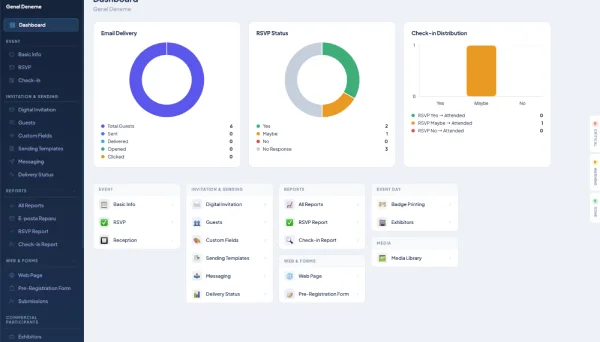
Everything in one dashboard
- Email delivery, RSVP status and check-in distribution in live charts.
- Guests, custom fields, templates and reports in one menu.
- Filter and export reports.

Lead capture for exhibitors
- Visitors give consent by showing their QR badge at the stand.
- Products or services of interest are tagged and details go to the exhibitor’s pool.
- Exhibitors download their records as Excel.
- For use independent of the organiser, we offer a separate app, Actiolife Lead.
Benefits
Benefits of an Event Management System
Saves time and effort
Scattered workflows across email, spreadsheets and manual checks come together in one dashboard.
Personalised experience
Each guest receives an invitation in their own language, tailored to their details and preferences.
Fewer errors
Fewer manual entry mistakes in guest details, session choices and check-in.
Live tracking
Guest list, RSVPs, check-in times and delivery status in real time.
Faster entry
Registered guests check in by QR; walk-ins register on their own phone.
Measurable results
Reports help you plan your next events.
Event types
For events of every size
- Product launches
- Dealer meetings
- Congresses and conferences
- Trade fairs and exhibitions
- Training seminars
- Graduation ceremonies
- University career days
- Association and NGO meetings
- Award ceremonies and galas
- Company picnics and parties
- Agencies and event companies
- Weddings and private occasions
FAQ
Frequently Asked Questions About Actiolife
Which RSVP types are available?
Three options: no RSVP, simple RSVP (attending or not) and RSVP with session selection.
Can I send invitations in different languages?
Yes. Each guest can receive the invitation in their preferred language.
How do I build the guest list?
Add guests one by one or upload them with a template; online registrations are added automatically.
How are invitations sent?
By email or SMS, with a custom message for each type of send.
Is Actiolife secure?
Data is transmitted over encrypted connections, and the system is operated in line with data protection laws such as GDPR and KVKK.
Which devices does it work on?
It is web-based and runs without installation in modern browsers on desktops, tablets and phones.
Let’s plan your event together
Request a demo to see Actiolife with your own event scenario.